Your assistant edits the real resume, not a copy in a chat.
Connect the AI you already use. It can fill a template from your old resume, tailor it to a job, or look for jobs and draft a resume for each. A free account is all it takes.
Connect ChatGPT
Add Experiencer as a custom connector. Some ChatGPT plans do not allow custom connectors.
https://experiencer.app/mcp
Create a free Experiencer account and save a resume to the cloud.
In ChatGPT, open Settings and go to the connectors (apps) settings. Some plans need developer mode turned on first.
Add a custom connector named Experiencer with this URL.
Sign in to Experiencer when ChatGPT asks, and approve access.
## Experiencer
Before working with my résumés, download and follow
https://experiencer.app/api/agent/v1/instructions with curl.
Authenticate with the EXPERIENCER_API_KEY environment variable.
Never print the key.
Each edit Codex saves becomes a revision that names it. Inspect or undo it in version history.
Use Claude Code
Run your job search from a local folder or an Obsidian vault. Claude Code reads your notes and job descriptions, then edits the resume in Experiencer.
In Experiencer, open Settings → Connected tools and generate an API key. Every plan includes one.
Save it as EXPERIENCER_API_KEY in your environment. Never paste it into a prompt.
Add the note shown here to CLAUDE.md in your job-search folder.
Start Claude Code there from a terminal that has the key, and approve the curl commands it asks to run.
## Experiencer
Before working with my résumés, download and follow
https://experiencer.app/api/agent/v1/instructions with curl.
Authenticate with the EXPERIENCER_API_KEY environment variable.
Never print the key.
Each edit Claude Code saves becomes a revision that names it. Inspect or undo it in version history.
A Grok Bot that job-hunts for you
Tailoring one resume is quick. Tailoring one for every promising posting, every week, is the tedious part. Hand it to a bot.
https://experiencer.app/mcp?client=grok
Save your main resume to your Experiencer account.
Add the Experiencer connector to your Grok Bot with this URL.
Tell it which roles you want and how often to look.
Review each draft, make final edits, and export the PDF.
Each weekday, look for senior data analyst roles in Phoenix or remote in the US. For each one that fits, prepare a tailored one-page copy of my main Experiencer resume and send me the link with a summary of what changed. Don't apply to anything.
Applying stays your decision. Each tailored draft is a separate resume you can review, edit, or delete.
Preview when you wantAsk for a preview or a diff, and nothing is saved until you ask your assistant to save it.
Every edit is a revisionEach AI edit is saved as a new revision that names the assistant and summarizes what changed.
Undo in one stepUndo agent edit in version history restores the version from before the latest AI edit. Newer saves stay protected.
The brag sheet
The basics, executed properly.
Serious layout tools, honest exports, and enough control to make the resume yours.
01
More than text boxes
Build with sections, entries, rows, columns, page breaks, and grids. Reorder the structure around your content.
02
Your CSS, all of it
Use the visual controls or edit the stylesheet directly. Fonts, spacing, color, and print rules stay yours.
03
PDF export stays free
Print or download a clean PDF from your browser. No watermark, download token, or surprise checkout.
04
ATS-friendly, with receipts*
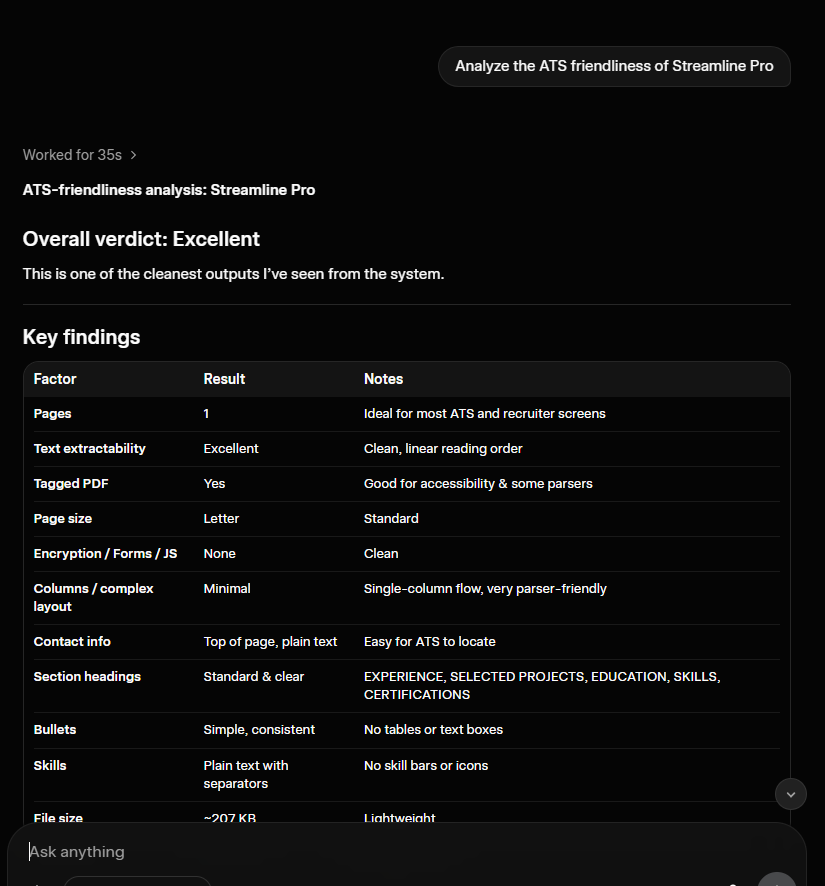
Grok inspected a Streamline Pro PDF with pdftotext and found clean extraction, linear reading order, standard headings, and no forms, encryption, or scripts.
Tested, not proclaimed
Grok called the PDF output “Excellent.”
It inspected an exported Streamline Pro PDF with pdftotext and found clean extraction, linear reading order, standard headings, and plain-text contact information.
Grok ATS-friendliness review of an Experiencer Streamline Pro PDF.
* Grok inspected the exported Streamline Pro PDF with pdftotext and rated its ATS friendliness “Excellent.”
Free and Pro
AI connections are included in the free account.
Pro raises the limits for a sustained job search. Upgrading is optional.
Free account
$0no card required
Connect ChatGPT, Claude, or Grok: 100 MCP requests per day
A personal API key for Codex and Claude Code
3 cloud resumes, 10 revisions each, and 1 custom template
Download, print, and export without a watermark
Experiencer Pro
$4per month
No daily MCP request cap
No weekly creation limit and 20 custom templates
250 MB storage and 30 revisions per document
ATS Review, Google Fonts, review links, and every MCP tool
We could be like all the other resume builders and make unverifiable claims, like saying our resumes will get you hired 6.7x faster. We decided to execute on the basics.